How Itemspring keeps a technical catalogue complete.
One model for every product, completeness counted for every channel and language, and the tools to close the gaps hundreds of products at a time.
Model your catalogue as it really is.
Define a family and its attributes once; every product in it follows. Technical values keep their units, lists keep their options, and variants inherit from their model.
- Attribute types
- Ten, among them text, number with unit, value list, yes or no, date and media
- Units
- A units catalogue shared by the platform; values are stored with their unit
- Variants
- Up to two levels, with values inherited from the model
- Categories
- Trees with a manual order of the products inside each category
- Reference entities
- Records such as brands or materials, linked from attributes
- Relations
- Accessory, successor or your own types, ordered, with an optional quantity
- Calculated attributes
- A text template or a number expression kept up to date by the database
- Value rules
- If these conditions hold, set or clear this attribute
- Channel values
- A channel can hold its own value, such as a shorter name for a marketplace
Completeness for every channel and language.
Each channel says which languages it publishes, which attributes it shows and which it requires. Itemspring counts, for every product, what is still missing for each of them.
- Per channel
- Languages with a fallback, categories, attributes, extra required attributes
- Per product
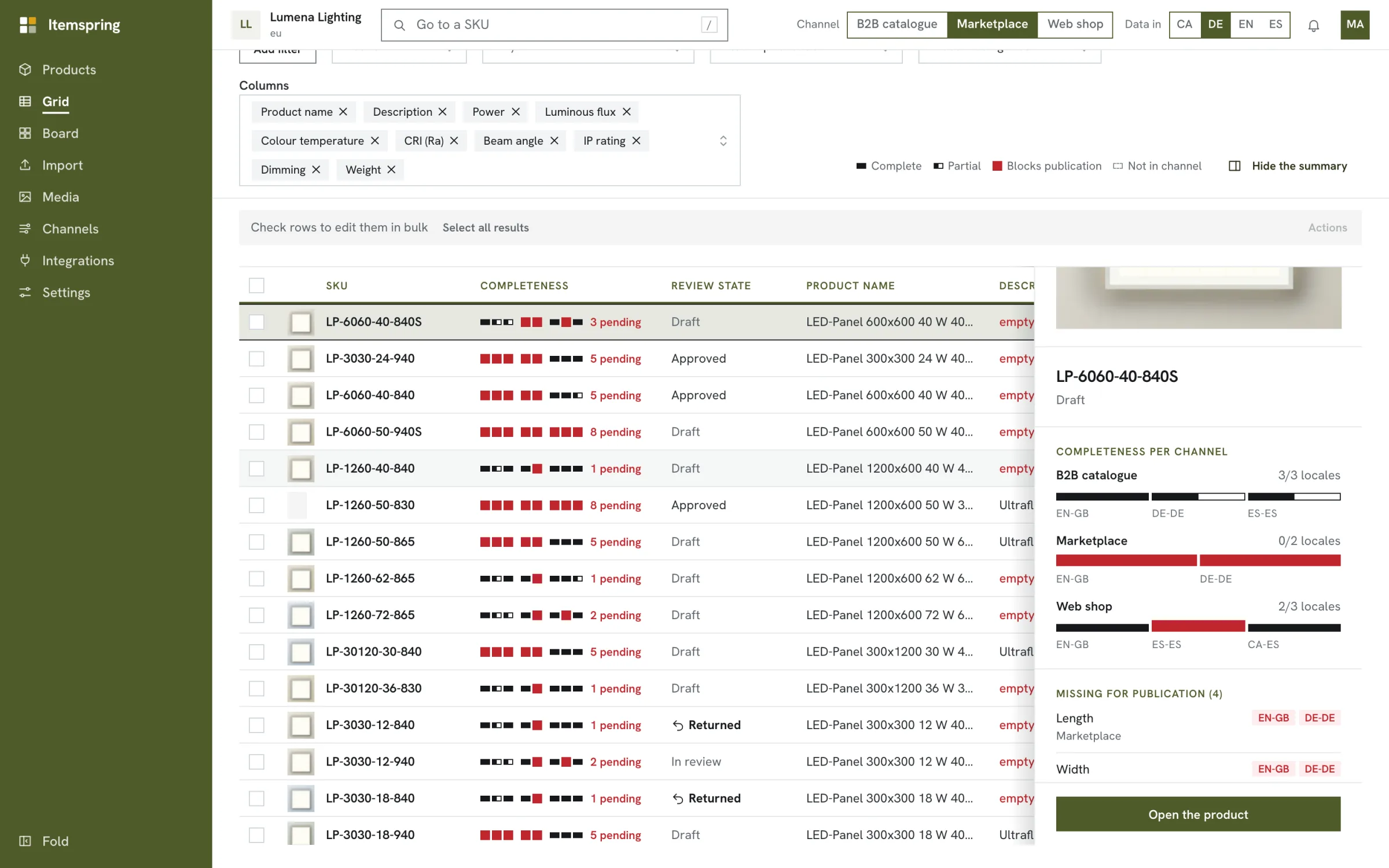
- Completeness shown per channel and language, with what blocks publication
- Not applicable
- An attribute can be marked as not applying to a product, so it stops counting
- In the grid
- Filters for complete, partial or blocking, and a most-missing-first order
Work on hundreds of products at once.
The grid of a family is where the catalogue gets finished: edit cells, filter to the gaps, select a thousand products and act on all of them.
- Grid per family
- Completeness segments per channel and language, cell editing, value filters
- Saved views
- Personal or shared, kept as tabs, with a default per family
- Mass actions
- Up to 1,000 products: set or clear a value, categories, archive, submit, approve
- Catalogue board
- Drag products between categories and set their order
- History
- Every change to products, models and records, with undo
Bring in the data you already have.
Start from the spreadsheet your team keeps today, and keep the files your suppliers send coming in without retyping them.
- Draft model
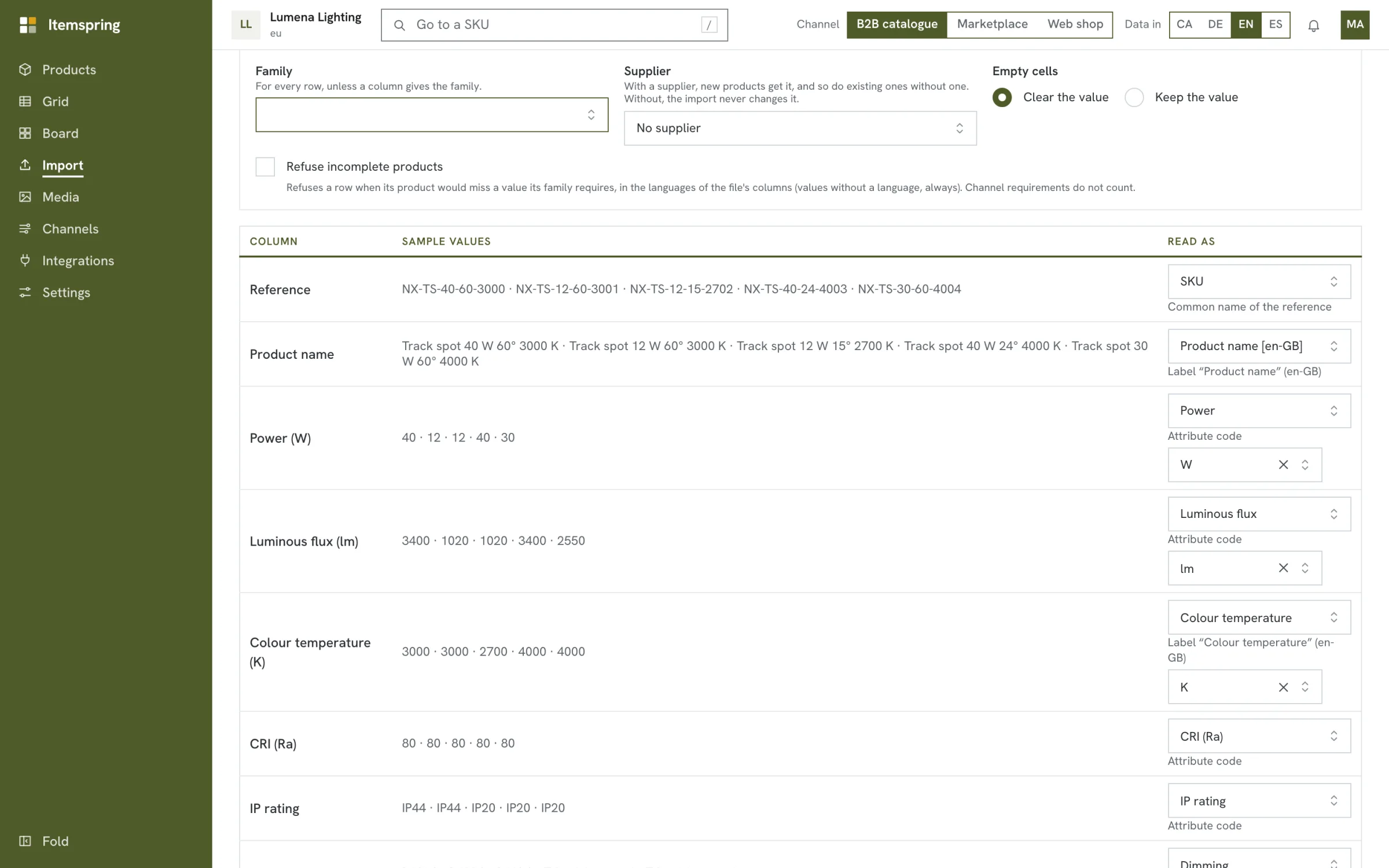
- From a sample file: a family and an attribute per column, with types read from the data
- Import
- Excel or CSV with column mapping, a preview, and a file of refused rows with reasons
- Suggested mapping
- Each column gets a proposed attribute, also from labels in other languages
- Supplier files
- Saved mappings per supplier, received at an upload address or fetched by SFTP
- Supplier report
- What each supplier must fix, in the supplier's language, as an Excel file
- Export
- What the grid shows, as Excel or CSV
Nothing is published before it is approved.
Products go through review in the stages you define. Approving publishes the reviewed content to the channels where the product is complete, and it stays there while the product is edited again.
- Review
- Submit, approve or return, in ordered stages when you define them
- Roles
- Permissions by area, limited to some categories, languages or channels
- Audit
- A history of configuration and access, and an access log per workspace
- Media
- Images and documents, including PDF and CAD files, with a public link per version
- Interface
- Catalan, Dutch, English, French, German, Italian and Spanish
Send us a spreadsheet. We'll show you what it's missing.
A 30-minute demo with a sample of your own catalogue, or a 30-day trial in a workspace of your own.
Or write to hello@itemspring.com
Priced by catalogue size, with every user, channel and language included. See pricing